
How to automate your business's WhatsApp inquiries
Automating WhatsApp is not about installing a chatbot that answers anything. It is about organizing a full system that receives, interprets, classifies, and answers inquiries, and knows when to hand the conversation to a person.

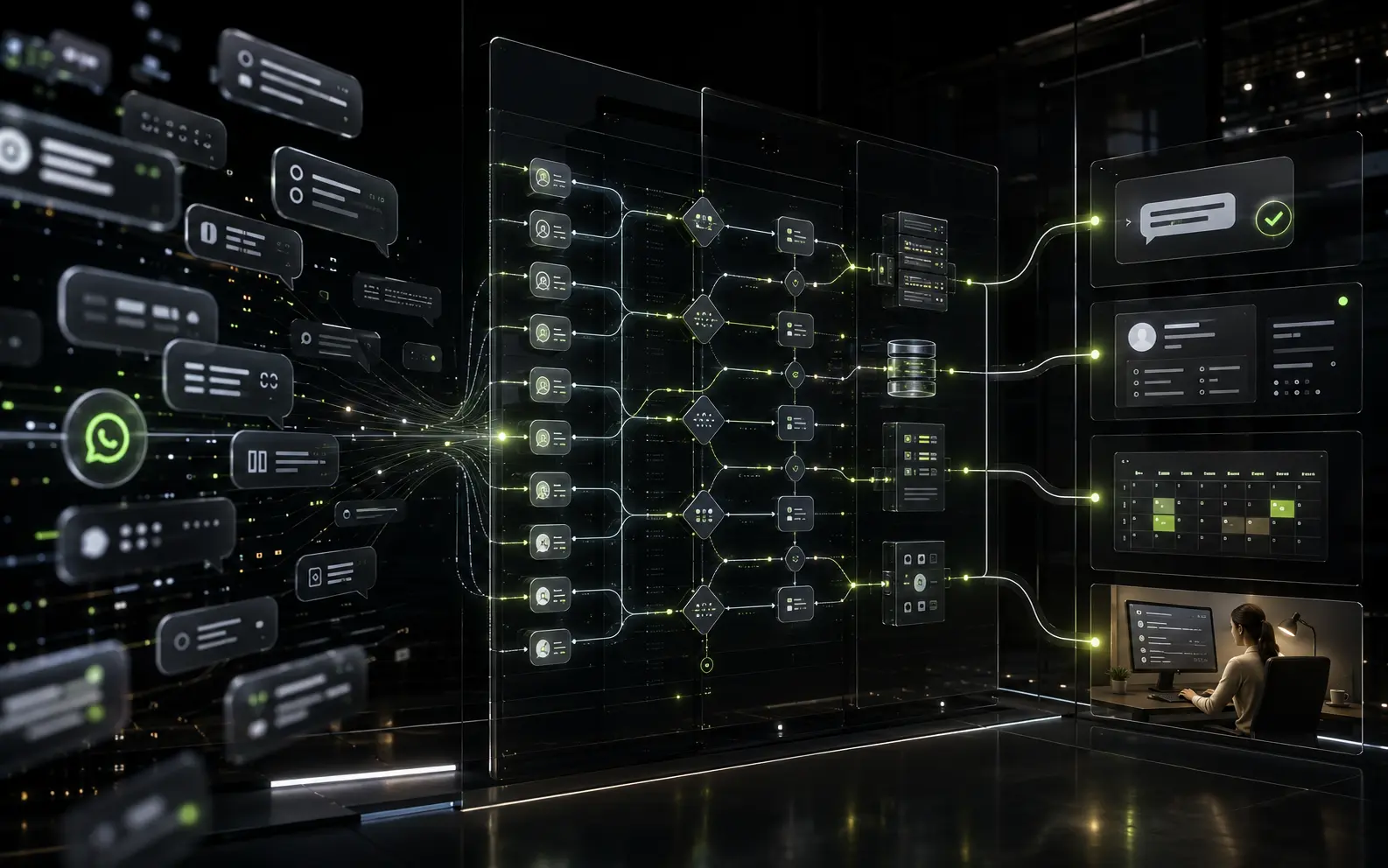
WhatsApp often becomes one of a business's most important sales channels, even if nobody planned it that way. That is where price questions arrive, along with doubts about hours, requests for availability, bookings, and quote requests. The problem shows up when that channel grows faster than the team's ability to respond: messages pile up, replies get delayed, and some inquiries end up lost among notifications.
Automating WhatsApp inquiries does not mean replacing that conversation with a bot that answers anything. It means organizing the way inquiries are handled: letting frequent questions resolve themselves, keeping information logged in one place, and having a team member step in exactly when needed, with the context already built.
What it means to automate WhatsApp inquiries
Automating WhatsApp inquiries can include several linked tasks: receiving the message, identifying what the person writing it needs, asking for any missing details, checking up-to-date information from the business, answering a frequent question, classifying that conversation as a real opportunity, logging what happened, executing a specific action such as booking an appointment and, when needed, handing the conversation over to a team member.
That is the main difference from a basic automated reply. A canned message that always says the same thing can work fine for an out-of-hours notice, but it does not resolve a real inquiry. A system connected to the business's own tools, on the other hand, can read a calendar, check a catalog, fill out a form, or notify someone on the team, because it is not isolated — it is part of a larger process.
Which inquiries can be automated
Not every inquiry needs the same treatment, but many of the ones that arrive on WhatsApp every day follow a fairly predictable pattern. Questions about prices and services, hours and location, product availability, bookings and appointments, order status, quote requests, or frequent questions usually have a clear answer that does not need a person involved every time. It is also possible to automate the first response outside business hours, so no inquiry goes without an initial reply, and to automate the capture and classification of potential customers, so the sales team receives the information already organized.
What should not be fully automated are sensitive, exceptional, or negotiation-heavy conversations. A complaint, a specific situation, or a complex request needs a person's judgment. That is why good automation does not try to solve everything: it identifies what it can resolve on its own and what needs to move into a team member's hands.
How a WhatsApp automation works
Even though every business has its own logic, the basic path of a WhatsApp automation usually follows a similar sequence. The customer sends an inquiry. The system interprets what they need, either through predefined rules or a language model that recognizes the message's intent. If information is missing, it asks for it in an orderly way, without requesting everything at once. When needed, it checks external systems: a calendar, a catalog, a pricing database, or a CRM. With that information, it answers the inquiry or executes a specific action, such as booking a time slot or generating an order. It then logs the outcome and, if the situation calls for it, hands the case to a person with the context already gathered.
A simple example helps show the whole picture: someone writes asking whether a service is available next Saturday. The system identifies the intent, asks for a preferred time, checks the calendar, confirms an available slot, shares the price, logs the booking, and notifies the business that a new appointment was confirmed. If the person asks for a special condition the system cannot resolve, the conversation moves directly to a team member, who already has everything needed to continue without asking the customer to repeat themselves.
Which tools the system can connect to
A WhatsApp automation does not work in isolation — its value comes precisely from connecting to the tools a business already uses. It can integrate with the WhatsApp Business Platform to manage messages, a CRM to organize leads and follow-up, a calendar for bookings and appointments, forms to collect data, an ecommerce or booking system to process orders, a database or spreadsheets to check and update information, email to send confirmations, and an admin panel so the team can oversee what is happening. Tools like n8n are often used to connect these systems without needing custom development for every integration.
There is no single combination of tools that works the same way for every business. The right architecture depends on the real process each company already has: which systems it uses, how the team is organized, and what information needs to be logged. That is why, before choosing what to connect, it is worth understanding how inquiries are actually handled today.
Traditional automation or artificial intelligence
Rules and menus for predictable processes
When inquiries follow a clear, repeatable pattern, a system based on rules and option menus is usually enough. It is predictable, easy to maintain, and works well for processes like booking a slot, checking a schedule, or choosing from a closed set of options.
Artificial intelligence to interpret more flexible language
When inquiries arrive written in many different ways, with typos, abbreviations, or loosely structured questions, a language model can better interpret the message's real intent. This is where AI-driven automation adds the most value, since it understands variations a fixed menu cannot cover.
A hybrid approach, the most common option
In practice, most automations that work well combine both approaches: clear rules for what is predictable, and artificial intelligence to interpret what is not. Using artificial intelligence does not mean letting the system respond without control: it is always worth defining limits, validations, and a clear criterion for when to hand the conversation to a person.
When to hand the conversation to a person
No automation should try to resolve one hundred percent of conversations. Some situations need human intervention: a complaint, a negotiation, a complex quote, ambiguous information the system cannot interpret with confidence, a priority customer, an unusual exception, or simply someone explicitly asking to speak with a person. It is also worth handing off a conversation when confidence in the message's interpretation is low: it is better to pass it along in time than to respond incorrectly.
A well-designed automation does not cut the conversation off abruptly when it hands off a case. It gives the team the context already gathered: what the person asked, what details they provided, and where the conversation stands. This way the customer does not have to repeat everything from scratch.
“Good automation does not replace the team. It takes the repetitive work off their hands so they can focus on the conversations that actually need their judgment.”
Benefits for the business
When the system is well designed, the benefits show up in everyday operations: faster initial replies, availability outside business hours, less time spent on repetitive tasks, inquiries organized by type and urgency, a consistent log of every conversation, better tracking of sales opportunities, and a clearer distribution of work across the business's different areas. All of that makes it possible to handle more inquiries without manual work growing at the same rate.
It is important to be realistic: automating WhatsApp does not guarantee more sales or automatic results. What it does offer is a more organized channel, with less friction for the customer and less operational load for the team — necessary conditions for selling better, though not the only ones.
Common mistakes when automating WhatsApp
Automating a process that was already disorganized
Automating something that does not work well manually does not fix it, it just replicates it faster. Before automating, it is worth organizing the real process first: what information is needed, in what order, and who should step in at each stage.
Building overly rigid conversations
When the system can only follow one fixed path, any unexpected message leaves it without a useful reply. It is worth planning for reasonable variations and, above all, a clear way out when the system does not understand.
Not offering a way to reach a person
If the only option is to keep talking to the system, some customers will get frustrated. There should always be a simple way to ask to speak with someone on the team.
Asking for too much information upfront
Requesting all the information at once, before the conversation has offered any value, tends to make people drop off. It is better to ask for data gradually, as it becomes necessary.
Not accounting for errors or unexpected messages
A voice note, an image, or an unplanned question can leave the system stuck. It is worth defining what happens in those cases, even if the answer is simply to hand off the conversation.
Responding without checking up-to-date information
If the system answers with data that is not connected to the business's real information, such as stock, prices, or availability, the risk of causing confusion or frustration is high.
Not logging or measuring conversations
Without a clear record, it is impossible to know which inquiries repeat the most, where the automation gets stuck, or what is worth improving. Measuring is what allows the system to be adjusted over time.
Trying to automate everything from the first version
Trying to cover every possible scenario from day one tends to produce long, expensive, and hard-to-maintain projects. It is better to start with what repeats the most and grow from there.
How to get started, step by step
A reasonable process for automating a business's WhatsApp inquiries usually follows these steps: analyze which inquiries repeat the most, choose one specific use case to start with, design the conversational path for that case, define which integrations and rules are needed, build a limited first version, test it with real situations, and, based on the results, measure, correct, and gradually expand its scope.
How much a business can actually automate
The answer depends on several factors: the volume of inquiries, how repetitive they are, the quality and availability of the business's data, and which integrations are feasible to build. A business with few daily inquiries and highly variable processes will automate less than one with high volume and predictable inquiries.
The general recommendation is to start with what is repetitive — what takes up time without requiring much human judgment — and keep a person involved in commercial decisions, negotiations, and special cases. It is not about automating for its own sake, but about freeing up the team's time for the conversations that truly need it.
“The question is not whether it makes sense to automate WhatsApp, but which part of that conversation can be resolved on its own without losing quality of service.”
Automating WhatsApp with a solution built for your business
The best solution for automating WhatsApp inquiries does not start by picking a chatbot or a trendy tool. It starts by understanding how inquiries arrive today, which questions repeat, what information is missing, and where in the process time or customers are being lost.
At Synttek, we analyze that process together with the business's team and build automations connected to the tools they already use — calendar, CRM, catalog, forms, or internal systems — so WhatsApp inquiries get resolved faster and the conversations that need a person arrive with all the necessary context.
Frequently asked questions
Can WhatsApp Business inquiries be automated?
Yes. The WhatsApp Business Platform allows the business's number to connect with external systems to automate replies, classify conversations, and execute actions, always within the platform's policies.
Do I need artificial intelligence to automate WhatsApp?
Not always. Many predictable processes work well with rules and option menus. Artificial intelligence adds value when inquiries arrive in more varied language or when it helps to better interpret each message's intent.
Can the automation hand a conversation off to a person?
Yes, and it should be able to whenever the situation calls for it. Good automation identifies when a case needs human intervention and gives the team the context already gathered.
Can WhatsApp be connected to a CRM or a calendar?
Yes. It is one of the most common integrations: it allows inquiries to be logged as opportunities and bookings or appointments to be confirmed directly against real availability.
Which inquiries should be automated first?
It is best to start with the ones that repeat the most and have a clear answer, such as prices, hours, availability, or frequently asked questions. From there, automation can expand to more complex processes.
Does a WhatsApp automation work outside business hours?
Yes. One of its main benefits is providing an initial response even when the business is closed, so no inquiry goes without a first reply until the team is available.
You might also like
AI agent for businesses in Argentina
An AI agent can answer queries, qualify leads, and automate repetitive tasks, 24 hours a day. Without hiring more people.


How much does a website cost in Argentina in 2026
A clear guide to understand how much a professional website can cost in Argentina, what each type of project includes, and how to choose the right option for your business.